
Instagram only lets you put clickable links in a few places, and the most lasting one is the link field on your profile. Adding one takes a few taps, as long as you use the right field.
The steps
The easiest way is through the Instagram app on your phone.
- Open Instagram and go to your profile.
- Tap Edit profile.
- Open the Links section.
- Choose the option to add an external link.
- Paste your address. You can add a short title too.
- Save and go back to your profile.
Instagram changes its screens from time to time, so the labels may look different for you or sit somewhere else. The route stays the same: go to the profile editing screen and find the part about links. If you get stuck, Instagram's help pages are the place to check.
Why isn't my link clickable?
The most common mistake is typing the address into the bio text. An address typed there usually stays as plain text. It needs to go in the links field instead.
Addresses in post captions usually aren't clickable either. That's why so many accounts say "link in bio" in their posts and send people to their profile.
Also check that there are no spaces before or after the address. Instagram may refuse some links. If you get an error, first open the address in a browser and make sure it works.
Test the link you added
Once it's saved, go to your profile and tap the link. For a better test, ask a friend to try it too. That way you know the page opens for other people as well.
If the link won't open, copy and paste the address again. A missing letter or a stray dot is enough to break it. Closing and reopening the app can also help you confirm the change was saved.
One link, or a bio link?
Instagram now allows more than one link on a profile. If you only have a couple of addresses, that may be all you need.
If you want to show more, such as your opening hours, photos, a form or event details, a single bio link address makes things easier. When details change, you update your page without touching Instagram.
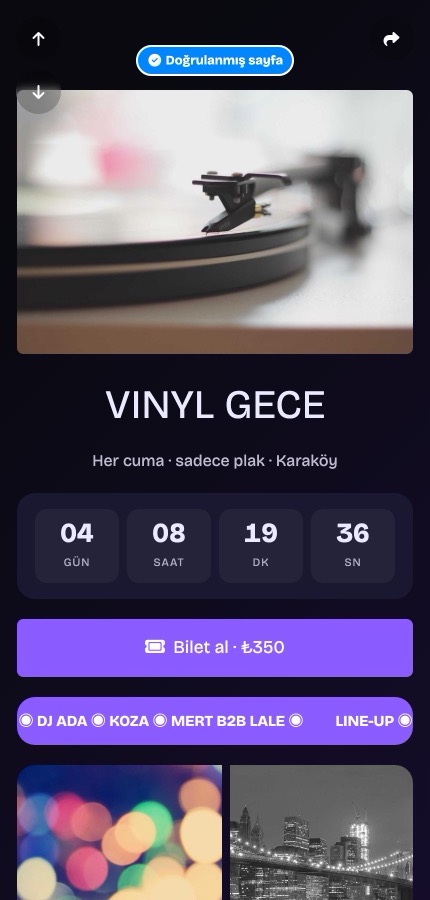
For example, a post could announce the event page above with "link in bio". Visitors then see the time left and the ticket button on one screen.
A bio link has its limits too. If you change your address later, the old one stops working and you'll need to update the link on Instagram as well.
In short
Edit your profile, add your address in the links field, save and test it. Remember that it goes in the links field, not in your bio text.
Want to try your own? You can start free at tappon.bio.