
When growing your brand online, building a complex web presence can sometimes slow you down. Creating a compact landing page for business profiles allows you to focus on direct customer actions without unnecessary friction. A mobile-friendly page in your Instagram or TikTok bio acts as your primary digital front door.
Why a Landing Page for Business Profiles Works
Small businesses, freelancers, and creators often need a fast, streamlined way to guide visitors to the right spot. A focused mobile page solves this by organizing essential details in one place:
- Local shops and cafes: Opening hours, instant directions, and menu access.
- Service providers: Direct booking links, portfolios, and customer review cards.
- E-commerce sellers: Highlighted product links, seasonal promotions, and support channels.
- Content creators: Recent videos, audio tracks, and newsletter sign-up forms.
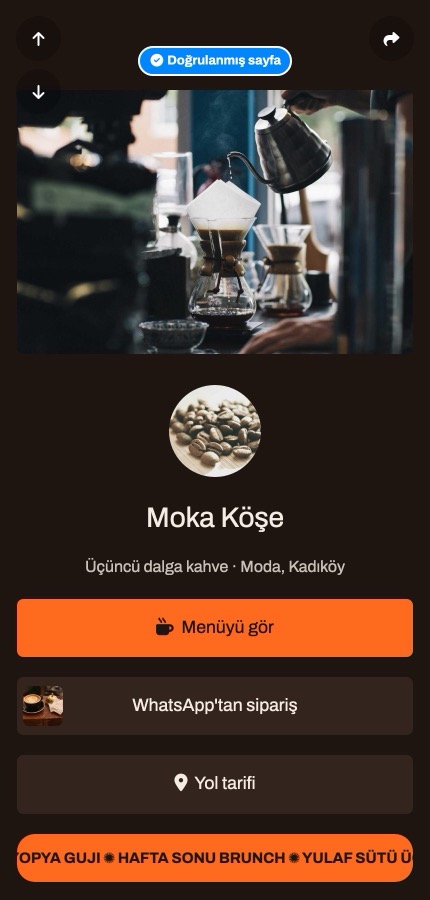
Setting Up Your Page via Biolink Pages
To build your showcase, log in to your account and navigate to the Biolink pages menu on the left side. This section manages all your mobile bio pages.
Follow these quick steps inside the Biolink pages menu:
1. Select Biolink pages from the left dashboard and create a new page.
2. Choose a clean address alias for your business link.
3. Open the page customization settings to pick a preset theme or set custom background colors.
4. Adjust your display preferences, tracking pixels, and SEO search tags.
If you want to know about taking payments from visitors or setting up transaction options, reach out to [email protected] for details.
Adding Clear Destination Buttons with the Link Block
The most essential element of any business landing page is the Link block. It serves as a clear call-to-action button that sends visitors wherever you want: menu, orders, tickets, or service pages.
To add one, open your page editor, click to add a new block, and choose Link. Input your label text and paste the destination address. You can drag and drop every Link block to reorder your navigation bar whenever your business goals change.
Comparing Features for Your Brand
Choosing the right builder depends on your brand requirements. For instance, Linktree's free plan offers unlimited links, core appearance options, and basic analytics. However, Linktree's help centre states in an updated article from 27 October 2026 that it does not support custom domains. Having your own branded web address is key when building long-term trust.
With tappon.bio, connecting custom domains is built right in. Additionally, statistics automatically filter out search crawler bot hits so you only measure real audience engagements.
Start for free today by visiting tappon.bio.