Someone who finds a café or restaurant on Instagram usually has a few questions in mind. What's on the menu? Where is it? When is it open? How do I book? A bio link brings the answers together on one page.
Here's what a venue's page could include.
The menu
The menu is often the most important button on the page. You can add it as a PDF or link to the page where it lives. When the menu changes, you replace the file and the address you've shared stays the same.
Orders and bookings
If you take orders on WhatsApp, you can give that its own button. For bookings, you could use a call button, a link to your reservation system or a short form.
There's a limit here: a form only collects requests. It doesn't reserve a table for you, so someone still has to follow up and reply.
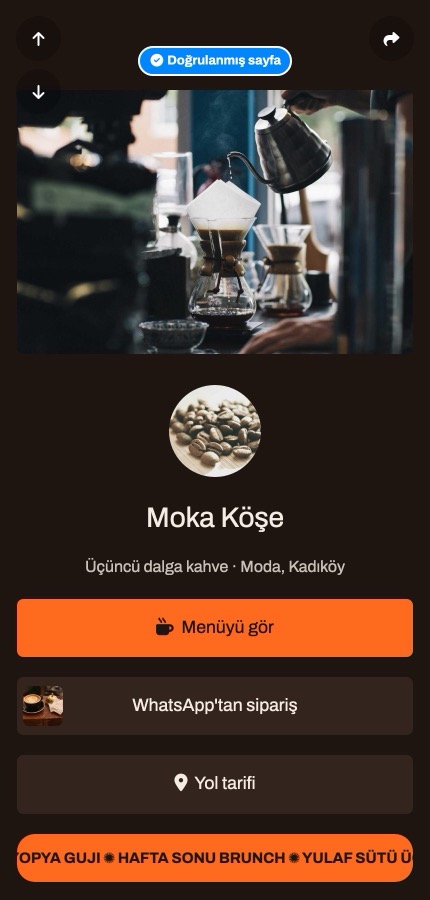
This example café page has three buttons: menu, orders and directions. The things customers look for most often sit on the first screen.
Hours and location
You can show your opening hours day by day and add a map or a directions button. If you're temporarily closed, you can say so on the page. Keeping this up to date really matters. Wrong hours are worse than no hours at all.
QR codes on the table
You can turn your bio link address into a QR code and put it on the table. Even if the menu changes, the code stays the same and you don't need to reprint it.
Test the code with a phone before printing. A dark code on a light background is the safest choice. Some customers would rather not scan a code, though, so think carefully before dropping printed menus altogether.
You can also turn your Wi-Fi details into a separate QR code so guests can connect easily.
Photos and announcements
A new dessert, this week's menu or a special evening can go near the top of the page. A short announcement tells customers what's different right now.
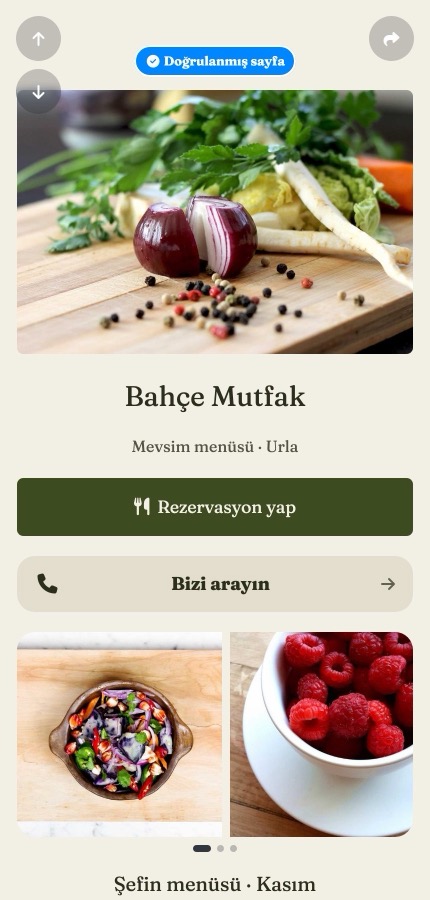
On this example restaurant page, the booking and call buttons come first, followed by food photos.
What not to expect
A bio link won't bring in customers by itself, won't push you up in Google results, and doesn't replace delivery apps or a reservation system. If you use those, the bio link is simply a short route to them. A venue that already has a website should keep it.
Decide who looks after the page from the start, too. If nobody is responsible for the hours and menu, the details soon go out of date.
In short
A good bio link page for a venue is short: menu, hours, location and contact. Get those four right first, then add the rest later.
Want to try your own? You can start free at tappon.bio.